iKitesurf: Weather & Waves
- 4.8
- Rating
- 50.00K
- Installs
- Free
- Price

 Analysis by App-foxy
When I first opened iKitesurf: Weather & Waves, I understood its appeal quickly: it is built for people who make decisions around wind, water and timing rather than simply checking whether the day will be sunny. WeatherFlow’s app is free to install, aimed at kiteboarding and kitesurfing conditions, and its Everyone rating makes it accessible even if you are still learning how to read a forecast. My first impression was practical rather than flashy. This is a tool meant to answer a very specific question: is it worth preparing my gear and heading to the beach?
That focus is also what separates it from a normal weather app. A general forecast may tell me about temperature, rain and broad wind conditions, but a rider needs to think about whether the wind will be useful, whether the water will be comfortable, and whether the forecast is stable enough to justify the trip. I found the app most valuable when I treated it as part of a decision-making routine, not as an entertainment app that I opened randomly.
From the first week to a lasting weather habit
I find that a weather app becomes genuinely useful when I stop checking it out of habit and start tying each visit to a decision: whether to pack, travel, wait, or call off a session. Keeping a simple note of what the forecast suggested and what I encountered can also help me calibrate my own expectations over time. That longer view makes it easier to judge whether the app is becoming a helpful part of my routine.
You May Also Like

 Pandora - Music & Podcasts
Pandora’s Music Is Easy to Start, but Harder to Recover
Pandora’s strength is its low-effort path from a seed to a station. Its weak spot is how much confidence it asks you to place in connection, setup, and quiet recovery.

 8 Ball Pool
 Is Built on Rivalries, Rematches, and Routine
A close look at the rivalries, rematches, shared routines, and unanswered safety questions that turn a quick pool match into a persistent mobile community.

 Samsung Music
’s Quiet Strength Is Playing What You Already Own
Its reach comes less from spectacle than from dependable access to a personal library. That simplicity is both the app’s strongest retention engine and its ceiling.

 AccuWeather: Weather Radar
AccuWeather Review: A Quick, Clear Forecast for Everyday Decisions
For everyday plans, the best forecast is the one you can understand quickly. AccuWeather makes rain timing, radar, and local conditions easy to act on, with a few trade-offs.

 Hill Climb Racing
Why Hill Climb Racing Still Turns Crashes Into One More Run
A tiny car, a bumpy hill and one more upgrade: Hill Climb Racing keeps resurfacing because its simple chaos makes every near-miss feel personal.

 AliExpress - Shopping App
AliExpress Makes Global Shopping Feel Personal, but Shoppers Bear the Risk
AliExpress turns a global marketplace into a pocket-sized discovery engine. Its reach is useful, its shopping loop compelling, and its trade-offs easy to miss.
More From Our News Desk
View All News


Why the first few sessions feel useful
During the first week, the strongest benefit is the app’s narrow purpose. Instead of forcing me to translate a generic weather screen into something relevant for kitesurfing, it puts the activity itself at the center. That saves mental effort, especially when I am checking conditions quickly before work, before packing, or while deciding whether a long drive is justified.
I also liked the way the app encourages a more disciplined reading of conditions. A beginner can easily focus on one attractive number and ignore the rest of the situation. In practice, a promising wind forecast does not automatically mean a comfortable or sensible session. I used the app as a prompt to consider the whole picture: the expected wind, the wave situation, the timing of the change, and whether those conditions suited my experience level and equipment.
That is an important distinction. The app does not replace judgment on the beach, local knowledge or safe riding decisions. What it does well is reduce the friction before leaving home. If I am comparing several possible riding spots, a dedicated kiteboarding forecast is more relevant than opening a standard weather service and mentally converting ordinary weather information into a session plan.
A realistic everyday scenario
Imagine a weekday afternoon when I have a short window after work. I do not need a beautifully presented forecast for the entire week; I need to know whether it makes sense to bring my board and kite that morning. I can check the expected conditions, compare them with my own comfort level, and decide whether to pack everything or leave the equipment at home. If the forecast looks marginal, that early check can prevent wasted travel and a rushed decision.
For a weekend trip, the workflow changes. I would check the app several days ahead to identify a promising period, then look again closer to departure instead of trusting the first forecast I saw. That habit is more useful than treating any single forecast as a promise. Weather changes, and a well-organized plan still needs a final reality check before I commit time, fuel and equipment.
One of my practical tips is to separate “possible” from “worth going.” A forecast that technically allows a session may still be unattractive if the timing is awkward, the conditions are inconsistent, or the trip is long. I found the app most helpful when I used it to narrow choices rather than to give myself an excuse to ride in conditions I would normally avoid.
What makes it different from ordinary weather apps
The usual alternative is a broad weather application that covers everything from city temperatures to storm alerts. Those apps are often better for daily life, commuting and general safety because they present a wider range of information. They may also be more familiar to family members or friends who do not kiteboard. For a rider, though, their weakness is that the information is not organized around the activity.
iKitesurf has a more specialized role. Its value is not that it should become my only weather source; its value is that it gives kiteboarding conditions a dedicated place in my routine. I would still use a general weather service for rain warnings, travel planning and broader local context. When the question is whether a session is likely to be worthwhile, however, this app is the more natural starting point.
That specialization comes with a trade-off. Someone who only wants a quick “will it rain today?” answer may find the app unnecessarily focused. A casual beach visitor may prefer one familiar weather app that handles temperature, precipitation and everyday forecasts in a single glance. This is a better fit for the person whose decisions genuinely depend on wind and waves.
Useful habits after the novelty fades
The first-week excitement of discovering a dedicated forecast does not automatically create long-term value. For me, the app earned a regular place only when I connected it to repeatable habits. I checked conditions at roughly three useful moments: when considering a session, when preparing equipment, and shortly before leaving. Each check had a different purpose, so I was not simply refreshing the same screen without acting on it.
A second useful habit was keeping a personal sense of what “good” conditions mean. The app can present weather information, but it cannot know whether I am practicing a new skill, taking a beginner with me, or looking for a challenging session. I learned to compare what I saw with my own recent experience. If a forecast looked attractive but had previously produced an uncomfortable day for me, I became more cautious instead of blaming the app.
Another non-obvious benefit is that regular use can improve forecast literacy. I began noticing how much difference timing makes. A day can look promising in the morning and become less useful later, or the reverse. Checking the forecast as a sequence rather than a single snapshot helped me plan more realistically. That is the kind of value that survives beyond the novelty of installing a new app.
The maintenance burden
In everyday use, the maintenance burden is fairly light, but it is not zero. Weather applications are only useful when I remember to check them at the right time and interpret them with some discipline. The app does not remove the need to update my plan when conditions shift. I still have to decide what equipment is appropriate, whether the location suits my ability, and whether I should cancel.
There is also a financial consideration. The app itself is free, which makes trying it uncomplicated, but it includes in-app purchases ranging from about five dollars to nearly one hundred eighty dollars per item. That means I would not assume that every useful capability is available without cost. Before paying for anything, I would first use the free experience across several real planning cycles and ask whether the additional value changes my decisions rather than merely adding more information.
That approach matters with specialist weather tools. More forecast detail can feel reassuring, but detail is not the same as accuracy or safety. I would rather have a simple routine that leads to sensible choices than pay for information I do not know how to interpret. The app is easiest to live with when I keep my expectations practical and treat purchases as optional decisions, not as a requirement for responsible riding.
The current release is version 5.0 and it supports devices running Android 5.0 or later. For someone using an older phone, checking compatibility before planning around the app is sensible. I also prefer to keep a backup way of checking conditions for travel days, because relying on one app for every part of a weather decision can create unnecessary stress if access or usability becomes inconvenient.
Where fatigue can appear
The biggest source of fatigue is the need to return to the app repeatedly without becoming overconfident. Forecast checking can turn into constant refreshing, especially when I am hoping for a session. That behavior does not necessarily improve the decision. I found it healthier to set clear checkpoints and accept that a marginal day may remain marginal even after several more looks.
Specialization can create another kind of fatigue. If I am planning a family beach day, a road trip or a normal week of errands, I do not want to move between several weather tools just to understand the basics. This app earns its space for kiteboarding-related decisions, but it does not replace a broad weather service for everything else. Keeping both roles clear prevents the app from feeling like another unnecessary icon on my phone.
There is also a learning curve in reading conditions responsibly. A newcomer may see a favorable forecast and assume that the session is suitable. I would strongly advise beginners to combine the app with instruction and local guidance. Forecast information can support preparation, but it cannot assess hazards, crowding, launch quality or the rider’s actual control on the day. That limitation is not a flaw unique to this app; it is an important boundary for every weather forecast.
Who should use it, and who should skip it
I would recommend it to active kiteboarders, kitesurfers who plan sessions around changing conditions, and travelers who need a specialized way to compare possible riding days. It is especially useful for someone who already knows the basics of wind and wants a more relevant planning tool than a general weather application. The free entry point also makes it easy to test without committing money immediately.
I would be more cautious about recommending it to someone who rarely rides, only wants ordinary temperature and rain information, or expects an app to tell them whether a session is safe. Those users may get more practical value from a general weather service or from direct advice at a local school or beach community. Likewise, a rider who already has a trusted local forecasting routine may find that this adds convenience but not enough improvement to justify another regular check.
For parents or friends accompanying a rider, the Everyone content rating is reassuring from an accessibility standpoint, but it should not be confused with guidance for unsupervised water activity. The app is suitable as a weather-planning tool; the responsibility for choosing an appropriate activity remains with the people involved.
How it holds up month after month
After the initial discovery period, the app’s value becomes less about impressive screens and more about dependable repetition. I kept returning to it when I had a real decision to make: whether to pack, whether to travel, whether to wait, or whether a forecast was strong enough to rearrange my day. That is a good sign for any utility app. It does not need to entertain me if it consistently helps me make a better plan.
The developer, WeatherFlow, has positioned this as a specialized source for kiteboarding and kitesurfing weather rather than a general-purpose forecast. That narrow identity gives it a clear reason to exist. It also explains why the app may feel unnecessary during weeks when I am not near the water. Its long-term value depends on whether riding is a recurring part of my life, not on whether I can find a reason to open it every day.
The app has an average rating of 4.8 from around 954 ratings, with over 50 thousand installs and roughly 108 written reviews. Those figures suggest a small but very positive audience, which fits my own impression: this is not trying to be a universal weather platform. It serves a defined group, and that group appears to appreciate the focus.
Still, positive user sentiment should not make me overlook the practical trade-offs. A specialized forecast can improve relevance, but it cannot guarantee that a session will match expectations. Local geography, personal skill, equipment and rapidly changing weather all matter. I would judge the app by whether it helps me make fewer poor planning decisions, not by whether every forecast produces perfect conditions.
My long-term verdict
The lasting value of iKitesurf: Weather & Waves comes from turning weather checking into a deliberate riding routine. I would keep it installed if kiteboarding or kitesurfing was a regular part of my schedule. The dedicated focus is more useful than a generic forecast when I am deciding whether to prepare gear or travel to the water, and the free price makes the trial straightforward.
I would not make it my only source for every weather question, and I would not treat it as a safety decision-maker. Its best role is narrower and more realistic: a specialized planning companion that helps me compare opportunities, check timing and avoid some wasted trips. The optional purchases deserve careful consideration because their cost can become substantial, but I can evaluate that gradually rather than paying before I understand my needs.
In the end, this is an app that earns lasting space through usefulness rather than novelty. If I ride often, I can build it into a simple check-before-packing habit and get recurring value from that routine. If I only visit the beach occasionally or want a general forecast for everyday life, the usual weather app will probably be the better choice. For the right user, though, WeatherFlow’s focused tool is a sensible, practical addition to the pre-session checklist.
FAQs for iKitesurf: Weather & Waves
01What is iKitesurf: Weather & Waves used for?
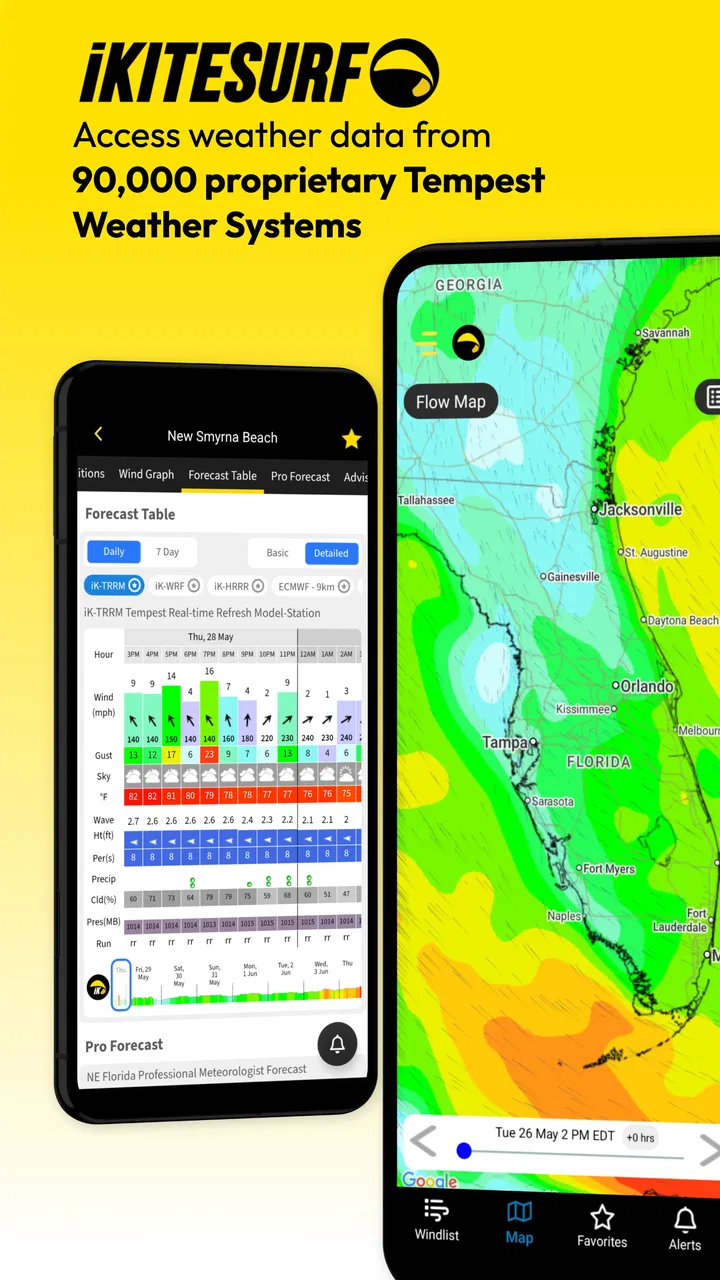
iKitesurf: Weather & Waves is designed for kitesurfers, windsurfers, sailors, surfers, and other outdoor enthusiasts who need reliable weather information before heading to the water. The app provides wind forecasts, wave conditions, tides, weather observations, and spot-related information, helping users compare locations and choose a safer, more suitable time for their activity.
02Are the wind and wave forecasts in iKitesurf accurate?
Forecast accuracy depends on the location, weather model, forecast range, and changing local conditions. In my experience, iKitesurf is useful for identifying wind trends, comparing spots, and checking current observations, but it should not be treated as a guarantee. Coastal weather can change quickly, so users should compare forecasts with live conditions and use sound judgment before entering the water.
03Does iKitesurf provide live wind conditions and webcams?
The app can offer access to real-time or near-real-time information for supported locations, including wind observations, station data, and, where available, webcams. The amount of information varies from one spot to another because it depends on local weather stations and camera providers. Some features may require an account, a subscription, or additional permissions to display properly.
04Is iKitesurf: Weather & Waves free to download and use?
iKitesurf may be downloaded at no initial cost, but not every feature is necessarily available for free. Advanced forecasts, extended forecast periods, premium weather models, detailed spot tools, alerts, or other enhanced services may be restricted to a paid membership or subscription. Before downloading, check the current listing for pricing, trial conditions, and recurring billing details on your device’s app store.
05Can beginners use iKitesurf safely to plan a session?
Beginners can use iKitesurf to learn how to read wind direction, speed, gusts, waves, tides, and forecast changes, making it a helpful planning tool. However, the app cannot replace lessons, local knowledge, safety equipment, or advice from experienced riders. New users should choose beginner-friendly locations, avoid extreme conditions, verify the forecast from several sources, and never rely on the app alone for safety decisions.
Pros
- Detailed wind forecasts with maps
- graphs
- and hourly breakdowns.
- Useful wave and tide information for planning water sessions.
- Large database of beaches and kitesurfing spots worldwide.
- Live observations help compare forecasts with current conditions.
- Custom alerts can notify you when preferred wind conditions arrive.
Cons
- Many advanced forecasts and features require a paid subscription.
- Forecast accuracy varies by location and local weather conditions.
- The amount of data may feel overwhelming for beginners.
- Some spot information can be incomplete or outdated.
- Frequent map and weather updates may use considerable mobile data.

iKitesurf: Weather & Waves
Gallery